
- 4/5 Verified Reviews
- 98% Approval
- 10,000+ Visas Delivered
- 256-bit SSL Secured
Status check
How to check your Australia eVisa status.
One-time code to your inbox. No login, no password. Under 2 minutes from email to status.
Step by step
Check your Australia eVisa status in 3 steps.
Have your application email handy. That's all you need.
01
Open the status check page
Visit ausevisa.com.au/status from any phone, tablet, or laptop browser. No app to install, nothing to download.
Bookmark this link. It's the only page you need to track any application you've ever submitted with us.
02
Enter your email and request a code
Type the email address you used when applying and tap Send code. A 6-digit one-time code lands in your inbox within seconds.
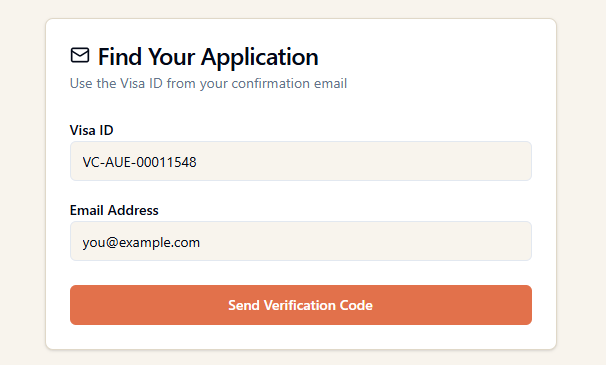
Can't see it? Check spam or promotions. Personal Gmail, Outlook, or Yahoo addresses get the code fastest. Some corporate mail servers filter transactional email.
03
Enter the code to view your status
Type the 6-digit code on the page. You go straight to your application, where you can see live status, download your approved eVisa, and retrieve your invoice.
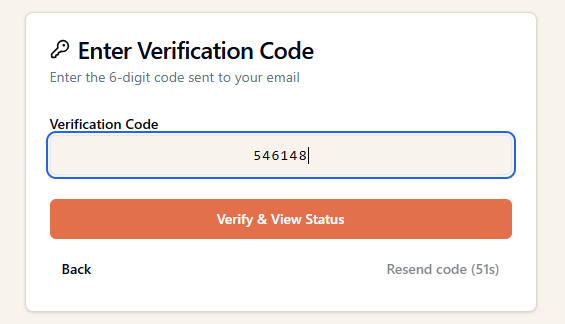
Each code is single-use and expires in 10 minutes. Closed the page? Just request a fresh code, no reset needed.
From one page
What you can do on your status page.
Once verified, every action lives in one place.
See current status
Pending Review, In Review, On Hold, Approved, or Refused. Always live.
Download your eVisa
Once approved, the PDF is ready to download. The eVisa is also linked electronically to your passport.
Retrieve your invoice
Download a PDF invoice for personal records or to claim back from your employer.
Contact support
Message our team on WhatsApp from the same page. 10-minute typical reply, Mon to Fri.
Status labels and what they mean
Pending Review
Just submitted. Our team will pick it up shortly.
In Review
A real person is checking your passport details and form answers.
Documents Re-review
Something needs a fix. We'll message you on WhatsApp with what to update.
On Hold
Paused by the Department of Home Affairs for a routine verification.
In Process
Submitted to Home Affairs. Waiting on the official issue.
Approved
Your eVisa is issued and electronically linked to your passport. Ready to travel.
Refused
Application not approved. We'll explain why and advise on the next step.
Cancelled
Cancelled before submission. Refund handled per our refund policy.
Quick answers
Status check FAQs.
Top questions, in plain English. Full FAQ on the FAQ page.
No. We use a one-time code sent to the email you applied with. No login, no password to remember, nothing to leak.
Each code expires 10 minutes after it's generated. If yours expires, tap Resend code and a new one arrives instantly.
Enter the email address you actually used on your application. That's where the code will be sent. If you no longer have access to that inbox, message us on WhatsApp and we'll verify your identity another way.
Yes. Once you verify with the code, the status page lists every application linked to that email so you can switch between them.
Yes. Codes are 6-digit, single-use, and expire in 10 minutes. They're sent only to the email on the application, so only the applicant or someone with inbox access can view the status.
Check spam or promotions first. If still missing after 2 minutes, tap Resend code. If your provider keeps filtering our mail, message us on WhatsApp and we'll send the code manually.
Only if they have access to your inbox. This is intentional, it protects your passport details and personal data without needing a shared password.
In real time. Every change in your application, from Pending Review to Approved, is reflected on the status page within seconds.
It means our team or the Department of Home Affairs spotted something that needs a second look (often a passport detail or a form answer). We message you on WhatsApp with exactly what to update.
From the status page, tap Download eVisa for the PDF. The eVisa is also electronically linked to your passport, so border officers can pull it up at check-in. We email you a copy the moment it's issued, just in case.
Printing isn't strictly required. The Australia eVisa is electronic and tied to your passport number. Many travellers still carry a printed copy for peace of mind at check-in or in case airline systems lag.
Our team contacts you with the reason from the Department of Home Affairs and outlines the next step. In some cases a fresh application with corrected details is the right move; in others, the regular Visitor Visa pathway is more appropriate. Either way, we walk you through it.
Ready to check your status?
Enter your application email, tap one button, see your status in under 2 minutes.